
Understand Your Security. All in One Place.
Scan the systems you own, see what matters most, map findings to PCI DSS 11.3 and share a clear report — in one hosted platform with nothing to install.
What Secure Assess does.
Vulnerability Scanning
Defensive external and credentialed scans of verified targets, on demand or on a schedule.
Learn moreAI-Prioritized Findings
Findings ranked with real-world threat data and explained in plain language.
Learn morePCI Readiness
PCI DSS 11.3 mapping and an ASV-readiness check: ready / not ready.
Learn moreReports & Insights
PDF reports, risk trends and finding history.
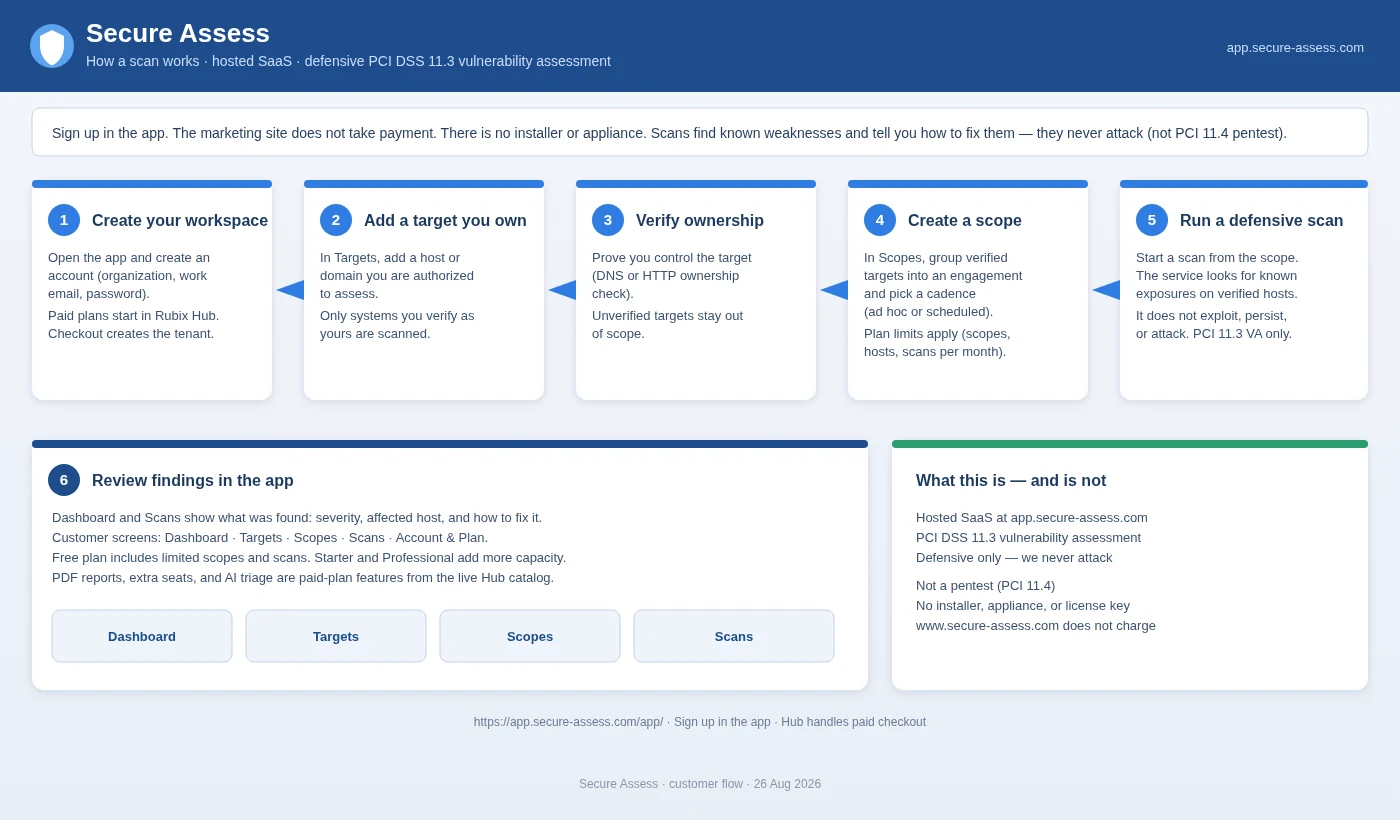
Learn moreHow It Works
From authorization to improvement in four steps.
Learn moreTeam & alerts
Owner, admin and member roles, two-factor sign-in, email and webhook alerts.
Learn moreTake a look inside.
Your security at a glance
See open findings by severity, scan activity and what changed since last time — on one dashboard.
- Counts by severity
- Trends from scan to scan
- Quick access to targets, scopes and scans
Every finding, with advice
Each finding shows what was found, where, how serious it is and what to do about it.
- Severity and affected host
- Plain-language fix advice
- Dispute, accept or mark false positive
Know what to look at first
On Starter and up, AI triage ranks and explains findings using real-world threat data — including whether public attack code exists.
- Weaknesses known to be used in attacks surface first
- Explanations, not just scores
- A person still decides
Readiness before your ASV scan
Findings are mapped to PCI DSS 11.3 and every scan gives an ASV-readiness check: ready / not ready.
- 11.3 mapping on every finding
- Blocking vs. advisory findings
- Readiness check — not an ASV attestation
Readiness check only — not an official ASV attestation.
A report you can hand to an owner
PDF reports with scope, findings, 11.3 mapping, advice and the readiness result.
- Same report shape every cycle
- Easy to compare quarter to quarter
- You keep the file
Scope: Storefront · 14 hosts · external + credentialed
Extra checks included.
Internet footprint
Attack-surface discovery on verified domains: subdomains, DNS and email settings, dangling records.
Website & TLS checks
Security headers, cookie flags, risky methods, exposed files, certificate expiry and old protocols.
Checkout script watch
Get alerted when a script on your checkout page changes or a new one appears.
Internet exposure checks
Confirm systems that should be unreachable from the internet really are.
Website checks are safe checks, not app penetration testing. Exposure checks don't test isolation inside your network.
See your network from the outside and the inside
Most scans only see what the internet sees. If you run a SecureGuard firewall, it can also look from inside your network for you, so you get one view of what's exposed on both sides.
- Inside view, no new hardware. Use your SecureGuard firewall as the inside agent. It checks your internal network and reports back. It never logs in, never sends attack payloads, and never changes anything on your devices. It connects out to Secure Assess, and we never connect in.
- Your public addresses, added for you. Once connected, your firewall adds the public addresses it uses, and they're scanned on your plan's schedule. As your firewall uses new public addresses, they're added for you.
- Close risky ports with one approval. When we find a risky open port, your firewall suggests a rule to block it. Nothing changes until you approve it.
- On every plan, including Free. Your plan's usual limits apply.
We scan and advise. We never attack.
- Only verified targets you own or are authorized to scan
- Read-only checks — we never attack or send payloads
- No changes to your systems — your team applies fixes
- Hosted SaaS — no installer, no appliance
See your security more clearly.
Start free — 1 scope, 16 hosts, 2 scans a month.